Category Archives: Windows

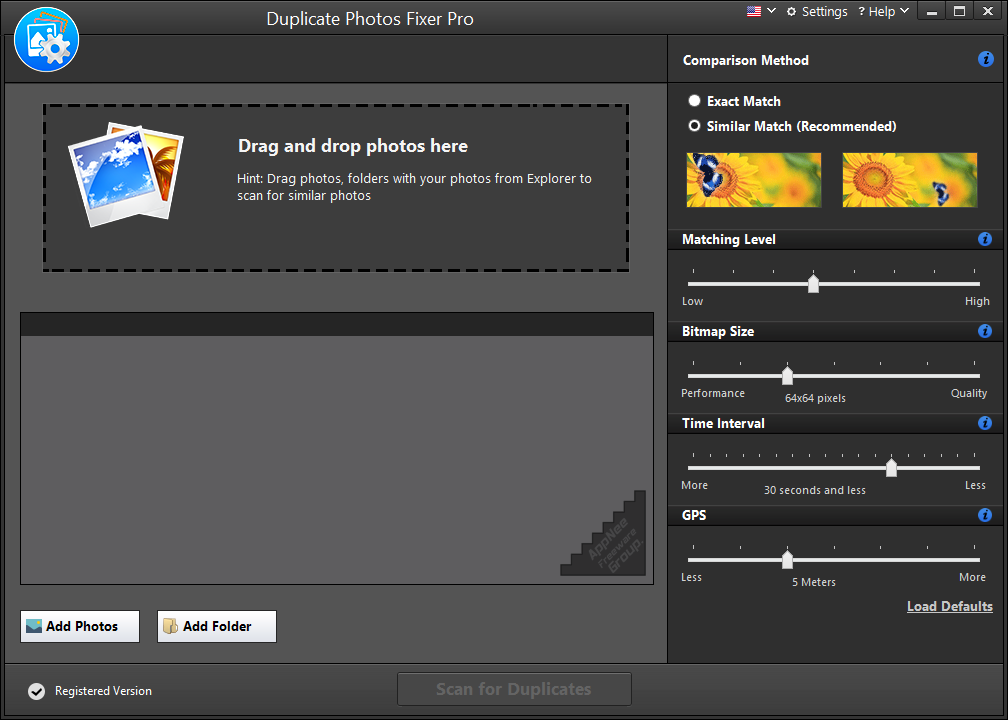
DUPLICATE PHOTOS FIXER PRO လေးပါ

DUPLICATE PHOTOS FIXER PRO လေးပါ ကွန်ပျူတာထဲမှာ ဓာတ်ပုံတစ်ပုံတည်းကို ၂ နေရာ ၃ နေရာကွဲးနေပြီး ပုံတွေထပ်နေတာတွေဖြစ်နေတာတွေကိုဖြေရှင်းဖို့အတွက်အသုံးဝင်ပါတယ်နော် windows အတွက်ရော mac အတွက်ရောထွက်ပါတယ်
Download (Windows)

Download (Mac)

windows ပြန်တင်ပြီးတိုင်းကြုံရတဲ့ပြဿနာတွေရှင်းပေးမယ် DRIVER REVIVER [V5.30] လေးပါဗျာ

 DRIVER REVIVER [V5.30] လေးကတော့ windows ပြန်တင်ပြီးတိုင်း driver တွေကို နေရာစုံကနေ ရှာရဖွေရတဲ့ ဒုက္ခတွေကနေ ကင်းဝေးစေမှာပါ ..

Features

  • Identify out-of-date drivers quickly and easily
  • Update ALL out-of-date drivers safely using original manufacturer drivers
  • Maximize the performance and functionality of your PC and its devices
  • Ensures your PC hardware is performing at optimum levels
  • Eliminates the risk of downloading a faulty or infected driver
  • Saves you time
  • Safe and Easy to Use

Installation Notes 

  1. Download and install Driver Reviver
  2. Exit program
  3. Copy the unlocked file to installation folder and overwrite
  4. Done

Download (32bit+64bit)

ULTRAISO [V9.7.2] လေးပါ

ULTRAISO ဆိုတာဘာာလဲဆိုတာမသိတဲ့သူတော့မရှိလောက်ပါဘူး အခုက Version (9.7.2) လေးပါ
  • Duplicate Disc to CD/DVD Image
  • Build Files/Folders to One ISO File
  • Organize and Manage Efficiently
  • Edit and Convert ISO File in Many Format
  • Make Bootable CD/DVDs
  • Create/Edit Audio CD Image  တွေအလွယ်တကူလုပ်လို့ရပါတယ်

သူ့မှာပါတဲ့ feature တွေကတော့အောက်ကအတိုင်းပါပဲ

  • Can directly edit the ISO image file
  • Can directly extract files and folders from ISO image file
  • Can add / delete /create new directory /rename ISO file image content
  • Can make ISO file from hard disk document
  • Can create CD/DVD image from CD/DVD-ROM, maintain bootable information
  • Can process the compact disc boot information, you can directly add/remove/extract boot image of the ISO image
  • Supports nearly all known CD/DVD image file formats (.ISO, .BIN, .IMG, .CIF, .NRG, .MDS, .CCD, .BWI, .ISZ, .DMG, .DAA, .UIF, .HFS and so on) , and can convert them to the industry standard and widely supported ISO image format
  • May directly set the file/folder to hidden attribute
  • Supports ISO 9660 Level 1/2/3 and Joliet extension
  • Automatically optimizes the ISO image file structure, saves the disc space
  • Supports the shell document type integration, Open Image files through double clicking them or the Right Click menu of the mouse with the open dialog
  • The double window user interface is extremely convenient to use
  • There are rich add-on tools, you can create ALL in 1 bootable compact discs, CD/DVD image file management, even the virtual CD/DVD drive, those functions are really powerful
Universal Registration Codes 
Version Registration Name Registration Code
v9.6.5- Home 4BA9-0D54-214A-C938
Heinzdieter Beckmann Jr 641D-D430-88E6-A656
Steve Olson 2BEC-ED28-82BB-95D7
Christopher Wydler 424F-ED23-7C0A-D75B
UltraISO 4C54-85DA-8D8D-4912
AppNee.com 8D01-F35C-3EF6-7D29
v9.3.0+ AppNee Freeware Group.
  • 5CF4938E297046BA
  • 21FEBF70D28C9650

Download

IDM (V6.35 B3) လေးပါ

အထွေအထူးပြောမနေတော့ပါဘူး IDM (V6.35 B3) လေးပါ

  • No crack or patch required
  • Registration-Free
  • Unlocked the main program ‘IDMan.exe’
  • No Internet connections shielding required
  • No warning pop-ups like “…registered with a fake Serial number…”
  • No not relapse
  • Removed automatic update detecting on a regular basis
  • Not random popup prompt about IDM update
  • Perfectly adjusted download box display for Windows 8.1/10
  • Removed daily reminder popup window
  • Disable the default startup on Windows starts
  • Removed useless menu items (Help, Registration), buttons and files (mainly help files)

Install လုပ်နည်း

  1. Download and install IDM (you’d better use the default setup path)
  2. Make sure to exit IDM completely (via Task Manager)
  3. Copy the unlocked files ‘IDMan.exe‘ and ‘IDMGrHlp.exe‘ to installation folder (like: C:\Program Files (x86)\Internet Download Manager\) and overwrite
  4. Double click the reg key file (Internet Download Manager.reg) to import license info (if you always use AppNee’s unlocked files, then this step is required only once)
  5. Restart computer (may be not required)
  6. Done

Download

ယူနီကုဒ်ဆိုတာကြီးစသုံးပြီး ဟိုဟာအဆင်မပြေ ဒီဟာအဆင်မပြေဖြစ်နေကြသူတွေအတွက်

For Android

sms တွေဖတ်မရမှာစိုးတဲ့သူတွေအတွက်
Connect MUX app >>> http://bit.ly/2zsUtdm

Contacts တွေ သီချင်နာမည်တွေကို ယူနီကုဒ်ပြောင်းချင်တဲ့သူတွေအတွက်
mmUniToolKit app >>> http://bit.ly/2ZvWIak

စာတွေ ၂ မျိုးတင်ချင်သူတွေအတွက်
pk Converter >>> http://bit.ly/2U80TbB
Rabbit Converter >>> http://bit.ly/2Zmfar0

စာရေးဖို့ကီးဘုတ်တွေထဲကမှတချို့ (ကျန်တာတွေလဲရှိပါသေးတယ် အသုံးများတာပဲပြပေးထားတာပါ)
gboard >>> http://bit.ly/2zpiAKf
K Keyboard >>> http://bit.ly/2PicLsz
ttKeyboard >>> http://bit.ly/2Pj4Uey
bagan Keyboard >>> http://bit.ly/2ZsyzWp
MUA Keyboard >>> http://bit.ly/2Zp3WBW
frozen Keyboard >>> http://bit.ly/2KZMgUD
Manic Keyboard (play store ကမဟုတ်) >>> http://bit.ly/2KYu8dP


Google Keyboard တွင်မြန်မာစကားပြောဖြင့် စာရိုက်ရအောင် ပြင်ရမည့်အချက်များ
၁။ google ကို updateမြှင့်ပါ
၂။ Gboard softwareထည့်ပါ
၃။ googleကိုဖွင့်ပြီး settingကို နှိပ်ပါ။
၄။ Search Languageကို နှိပ်ပြီး Burmeseကို ရှာနှိပ်ပြီး back key တစ်ချက်နှိပ်ထွက်ပါ။
၅။ Voiceကို နှိပ်ပြီး အောက်ဆုံးမှာ မြန်မာ ဘာသာကို နှိပ်ပါ။ saveနှိပ်ထွက်ပါ။
၆။ Languages and inputeထဲဝင်ပြီး default keyboardကို နှိပ်ကာ Gboardကို နှိပ်ပါ။
၇။ အောက်နားက Gboardကို နှိ ပ်ပြီး Languageကို နှိပ်ပါ။
ပြီးရင် Add Keyboardကိုနှိပ် Burmeseကို နှိပ်ပြီး Doneနှိပ်ပါ။
စာစတင်ရိုက်ဖို့ keyboardပေါ်တဲ့အချိန် မြန်မာ keyဘက်ကို ကမ္ဘာလုံးနှိပ်ကာ ပြောင်းပြီး voice သင်္ကေတကို နှိပ်ကာ မြန်မာလို စကား စပြောပြီး စမ်းနိုင်ပါပြီ။
(မှတ်ချက်-ယူနီကုတ်ဖောင့်ဖြင့်သာ ပေါ်ပေးပါသည်။ စက်ရုပ်ဖြစ်၍ programသွင်းတုန်းက အသံအတိုင်း အသံမှီမှ အမှန် စာများထွက်ပေးပါသည်။ လိုအပ်ချက်များ ရှိနေသေးသည်ဟု ထင်ပါသည်😊😁)

Gboard app Link >>> http://bit.ly/2zpiAKf
Google app link >>> http://bit.ly/2KZnrIq


For iOS

Setting >> General >> Profile အောက်က Zawgyi profile ကိုဖျက်လိုက်ပါ ပြီးရင် ttKeyboard မှာ MyanSan or ZawCode(Unicode) ကို add လိုက်ရင်ရပါပြီ

PYAUNG by Hein thet Khin zaw >>> https://apple.co/2L2XXdh

Rabbit Converter by COMQUAS Co., Ltd >>> https://apple.co/2Hts8rJ